
 English
  Français
  Italiano
  Español
  Português
  Deutsch
 WP Umbrella alternative built for client-facing agencies
Everything WP Umbrella does: updates, backups, monitoring. Plus what it doesn’t: a built-in support ticket system, time tracking and a white-label client dashboard.
Start free Video: see what Glow can do
- No credit card needed
- No contracts
- Cancel whenever


Why digital agency and web development teams are choosing Glow, as their WP Umbrella alternative

Support tickets

WordPress maintenance

Client reporting

Time tracking

Teams & permissions

Client dashboard

Backups & restore

AI assistants

WordPress Maintenance
Client reporting
A modern, innovative WP Umbrella alternative
Glow brings ticket support, WordPress maintenance tasks, client reports and time tracking into one dashboard.


AI assistants
Ask about every site you manage at once, instead of checking them one at a time.
Connect Claude or ChatGPT and ask which sites run a vulnerable plugin version, what needs updating today, or which clients are over their hours. Then tell it to run the updates, safely.
No competitor on this page offers anything like it.


Which of my sites run Elementor below 3.18?
Three of your 41 sites are on an older version:
- harborview.example.com 3.16.4
- lintonarts.example.com 3.17.1
- pageandco.example.com 3.15.9
Update those three, safely
Started. Each takes a backup and a screenshot first, then I check the site afterwards and roll back if anything breaks.
Read-only unless you allow updates. It sees only what your own login sees.


Digital agency and web development teams trust Glow:
WordPress Management Tools
WordPress Management Tools
WordPress Management Tools
WordPress Management Tools


We used to have time tracking, tickets & reporting across different tools. Glow centralises all this into one easy to use dashboard.
Rick Makin, Head of Web Design, 21 Degrees Digital

I think of Glow as having it all in one place. They thought of everything that we need in order to manage our clients’ WordPress sites.
Jason Bass, Founder at Jason Hunter Design

Glow’s reports system is incredibly useful for keeping track of updates, security checks, and performance insights. It saves me tonnes of time.
Wayne Reed, Owner, Reedy’s Web Designs
Got 2 mins? See what Glow can do:
Introduction
WP Umbrella has a really solid set of technical maintenance features, however it lacks the ability to perform any kind of client support, which is of course a hugely important part of an agency’s support & maintenance service. - Phil Storey, Founder of Glow
Managing multiple WordPress websites can be a daunting task for agencies. While tools like WP Umbrella offer robust technical maintenance features, they often fall short in areas crucial for client relations and support. In this article, we’ll explore why WordPress management tools are vital and highlight some top alternatives to WP Umbrella that provide a more comprehensive solution.
Let’s dig in.
Why Use a WordPress Management Tool
At Glow, our software manages thousands of WordPress websites, and we speak to WordPress agency owners every day. The top three reasons we see agencies investing in WordPress management are:
- Reporting: Send regular reports to clients to showcase the work done in maintaining their websites. This not only proves the value of your service but also helps retain clients on support and maintenance plans month over month, year over year. Agencies often resort to manual report generation using software like Adobe or rely on products like Glow.
- Handling Support Requests from Clients: Many agencies still use email to manage support requests, which is far from ideal for a team of developers. A centralized system for handling these requests streamlines communication and boosts efficiency.
- Keeping on Top of WordPress Updates: Without a management tool, customers manually log in and out of each website to run updates—a time-consuming process. Utilizing a management platform simplifies this task significantly.
If we had to pick one word to summarize the value these platforms provide, it would be efficiency. Successful agency owners grow their businesses by improving efficiency and leveraging technology and automation.
WP Umbrella Alternatives
While WP Umbrella is a popular choice for WordPress site management, several alternatives offer unique features that might better suit your agency’s needs. Here are five noteworthy options:
MainWP
MainWP is a self-hosted WordPress management solution that gives you complete control over your network of sites.
- User Interface: Intuitive dashboard hosted on your own WordPress installation.
- Security: Offers robust security features, including vulnerability checks and backups.
- Pricing: Free core plugin with extensions available for purchase.
- Support: Community support forums and premium support for extension users.
WPMU DEV
WPMU DEV provides a suite of WordPress tools for site management, optimization, and security.
- User Interface: Modern dashboard with access to all WPMU DEV plugins and services.
- Security: Includes Defender Pro for enhanced site security.
- Pricing: Membership starts at a monthly fee, including all plugins and support.
- Support: 24/7 live support and extensive documentation.
WP Remote
WP Remote focuses on providing straightforward WordPress site management with an emphasis on backups and updates.
- User Interface: Clean and simple dashboard for easy navigation.
- Security: Secure cloud backups and update management.
- Pricing: Offers a free plan with basic features and premium plans for advanced needs.
- Support: Email support and knowledge base resources.
GoDaddy Pro
GoDaddy Pro is a platform designed for web professionals to manage client websites efficiently.
- User Interface: Unified dashboard to manage all client sites and products.
- Security: SSL management and security monitoring tools.
- Pricing: Free to join with pay-as-you-go services.
- Support: Dedicated support team for Pro members.
Glow
Glow is an all-in-one platform that combines WordPress maintenance and client support into one seamless experience.
- User Interface: User-friendly dashboard designed for efficiency.
- Security: Comprehensive maintenance tools and security features.
- Pricing: Flexible pricing on a per-website basis.
- Support: European-based support with a free white glove migration service.
Summary of Alternatives
| Tool | User Interface | Security Features | Pricing | Support |
|---|---|---|---|---|
| MainWP | Self-hosted dashboard | Vulnerability checks, backups | Free core, paid extensions | Community and premium support |
| WPMU DEV | All-in-one dashboard | Includes Defender Pro | Monthly membership | 24/7 live support |
| WP Remote | Simple dashboard | Cloud backups, updates | Free and premium plans | Email support |
| GoDaddy Pro | Unified client dashboard | SSL, security monitoring | Free with paid services | Dedicated Pro support |
| Glow | User-friendly dashboard | Maintenance, security tools | Flexible plans + per-site pricing | Live chat & ticket support |
More About Glow
Almost all agencies need the same core set of tools to efficiently manage multiple WordPress sites: a support system, a maintenance system, client reporting, team collaboration, and time tracking. With traditional WordPress management software, you can get some of those tools, but not all.
"Glow is incredibly user friendly. We have 30+ reports to produce monthly, which used to be a manual process and is now much simpler. It’s saved us a lot of time." - Georgia Robertson, Production Manager, Zap Creative
Glow is the only product in the market that offers the ability to handle your entire WordPress care plan/support and maintenance service from one dashboard.
Here are five reasons why Glow stands out as a top alternative:
- Fast, always-human support: Whenever you need us, it’s us you’ll chat to. Not AI. Not a chatbot. Actual humans.
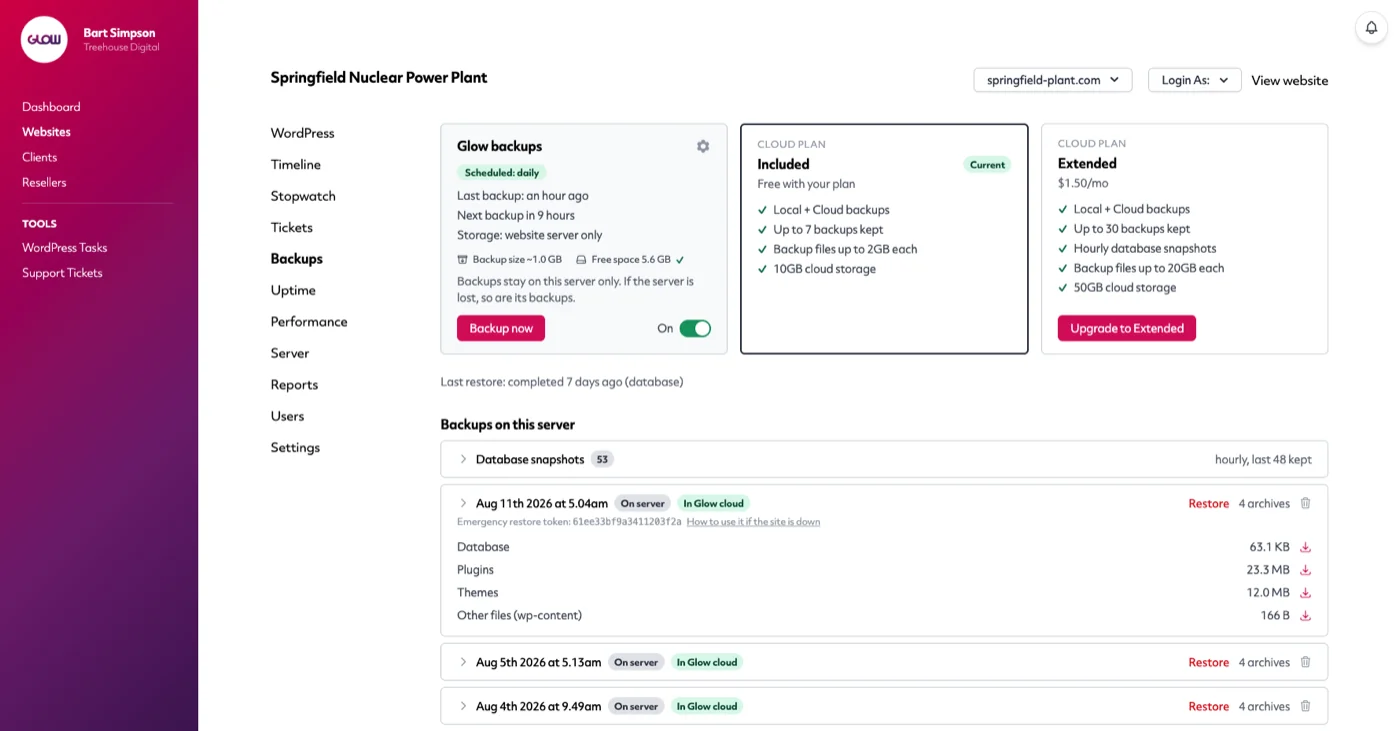
- Maintenance and support ticketing in a single platform: Streamline your workflow by managing everything in one place.
- Flexible pricing: All features are included in every plan, with the option to extend your existing plan by adding more websites on a pay-as-you-go basis, making it cost-effective for agencies of all sizes.
- Leading industry reporting: Provide your clients with detailed and professional reports effortlessly, helping you to consistently prove the value of your service.
- Free white glove migration service: Transition to Glow smoothly with expert onboarding assistance at no extra cost.
Click here to download our free website report template and see what Glow can do for you.